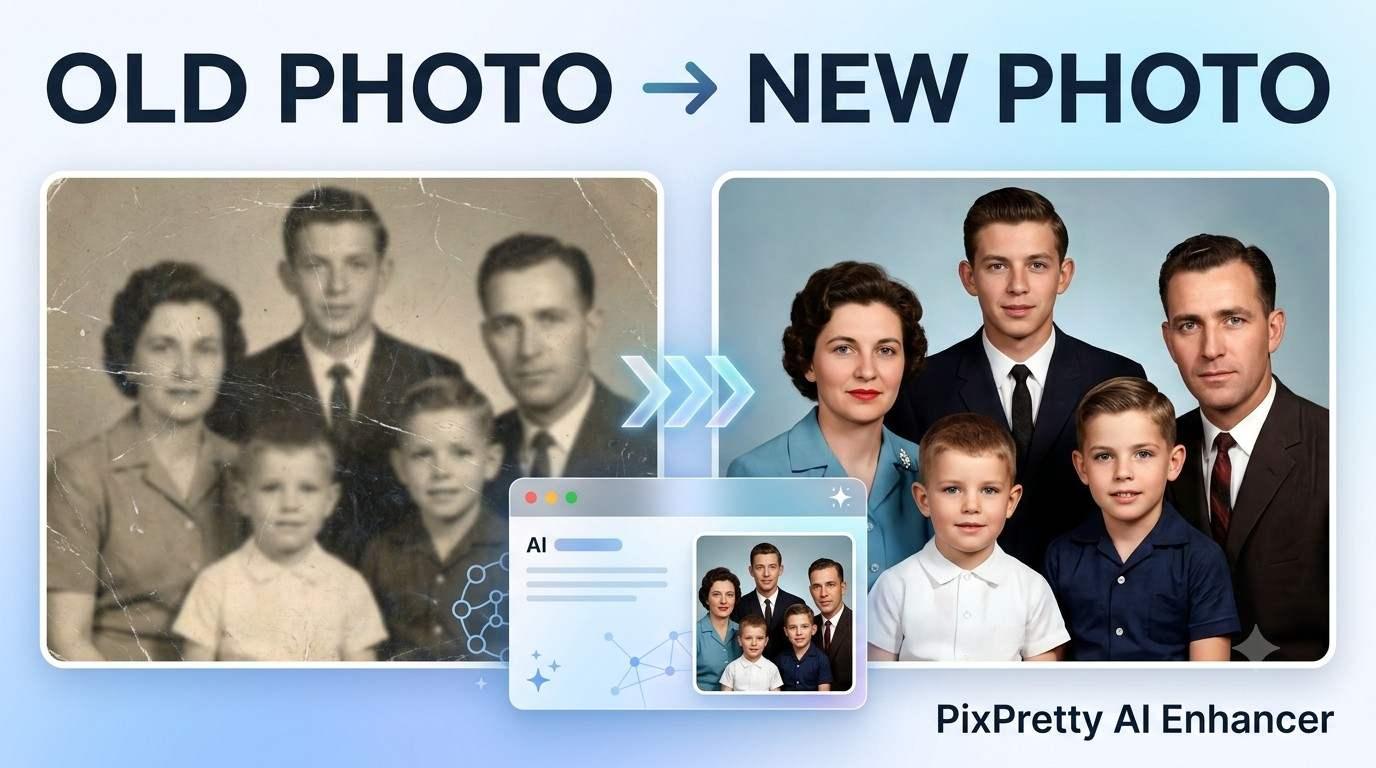
Old photos can lose their clarity over time. Blurry faces, low resolution, faded details, scratches, and image noise can make an otherwise meaningful picture difficult to enjoy or share. Traditional photo editing can fix some of these problems, but it often takes time and requires knowledge of editing software.
Tenorshare PixPretty AI Photo Enhancer offers a simpler approach by using AI-powered image enhancement tools to improve the appearance of photos. It can be useful for restoring older pictures, improving low-quality images, sharpening details, and preparing photos for sharing or printing.
If you're considering an AI photo enhancer, this guide explains what PixPretty does, how it works, what features to look for, whether you can use it for free, and what to know before purchasing.
What Is Tenorshare PixPretty AI Photo Enhancer?
Tenorshare PixPretty AI Photo Enhancer is an AI-based photo editing and enhancement tool designed to improve image quality with automated processing.
Instead of manually adjusting multiple settings, users can upload an image and let the software process areas such as sharpness, detail, resolution, and overall image quality.
It can be particularly useful for:
-
Old or low-quality photographs
-
Blurry images
-
Portraits with limited detail
-
Low-resolution pictures
-
Images affected by noise
-
Photos that need enlargement
-
Pictures prepared for online sharing
The main attraction is convenience. Someone who does not have advanced Photoshop or Lightroom skills can use an automated workflow instead of manually adjusting every image setting.
Why Do Old Photos Look Worse Over Time?
An old photograph may have several quality problems at once. Physical photographs can become faded, scratched, or damaged, while older digital images may simply have a low resolution compared with modern cameras and smartphones.
Common problems include:
Simply increasing an image's dimensions does not necessarily make it clearer. An AI enhancement system attempts to process the existing visual information and reconstruct or improve details.
That makes AI enhancement especially interesting for family photographs, scanned pictures, social media images, and older digital files.
How Does PixPretty AI Photo Enhancer Work?
The basic process is designed to be straightforward.
First, you upload the photograph you want to improve. The AI then analyzes the image and identifies areas where enhancement may be useful.
Depending on the available tool or mode, processing can improve aspects such as:
-
Image sharpness
-
Resolution
-
Facial details
-
Texture
-
Noise
-
Overall clarity
After processing, you can compare the result with the original image and decide whether the enhancement is suitable for your purpose.
The important point is that AI enhancement is not the same as recovering every original detail perfectly. When information has been completely lost from a very damaged photograph, software may generate an approximation rather than recover the exact original pixels.
How to Enhance Photos With PixPretty AI
If you're new to AI image enhancement, the workflow is generally simple.
Step 1: Choose the photo
Select the old, blurry, compressed, or low-resolution image you want to improve.
For restoration work, use the highest-quality version of the original photograph available.
Step 2: Upload the image
Upload the photograph to PixPretty and select the relevant enhancement function.
A better-quality source image usually gives an AI system more visual information to work with.
Step 3: Let the AI process the image
The system analyzes the image and applies its enhancement process.
Processing time can vary depending on the image and the tool being used.
Step 4: Review the result
Compare the enhanced version with the original.
Look closely at faces, hair, eyes, clothing, text, and other important details. An image may appear sharper overall while some small details look different from the original.
Step 5: Download the result
If the result meets your needs, save the enhanced image for printing, sharing, archiving, or additional editing.
Can PixPretty Improve Old and Blurry Photos?
Yes, AI enhancement tools are designed to improve images affected by problems such as blur, low resolution, and missing visual detail.
However, the result depends heavily on the original photograph.
For example, a moderately blurry family photograph may respond well to enhancement because enough information remains in the image. A heavily damaged photograph with large missing areas can be more difficult to restore accurately.
For important historical or family photographs, it is a good idea to preserve the original scan before experimenting with enhancement.
Does PixPretty AI Improve Photo Quality?
AI enhancement can make a photograph appear sharper, cleaner, and more detailed, particularly when the original image is low resolution or lacks clarity.
The improvement is most noticeable when you compare the original and processed versions side by side.
For example, an old portrait might have:
-
Soft facial details
-
Visible image noise
-
Low resolution
-
Poor contrast
After enhancement, the image may appear cleaner and more suitable for viewing or printing.
The result should still be evaluated carefully. AI-generated detail is not necessarily identical to information that existed in the original photograph.
PixPretty AI Photo Enhancer Features Explained
AI photo enhancement is only one part of the modern image-editing workflow. Depending on the current PixPretty product and plan, users may also find tools intended for background removal, image editing, batch processing, or other AI-powered image tasks.
Image enhancement
The core purpose is to improve the visual quality of an image by processing clarity, detail, and resolution.
Background removal
AI-powered background removal can help separate a subject from its original background without requiring manual selection around every object.
Batch processing
For users working with many photographs, batch functionality can reduce repetitive work by allowing multiple images to be processed.
High-resolution output
Higher-resolution output can be useful when an image is intended for printing, presentation, or larger displays.
Because software features and plans can change, check the current product page before relying on a particular feature or limit.
Is Tenorshare PixPretty AI Photo Enhancer Free?
Whether you can use PixPretty without paying depends on the current plan, available credits, features, and any promotional access offered by the service.
Some AI photo platforms allow users to test selected functions before requiring payment for additional processing or higher usage limits.
If you're only enhancing a few images, compare the available free access with the amount of processing you actually need. If you have a large collection of old photographs, pricing and credit limits become more important.
PixPretty AI Photo Enhancer Price: What Should You Check?
Before purchasing an AI photo enhancement service, don't look only at the advertised subscription price.
Check:
-
Number of available credits
-
Image-processing limits
-
Maximum output resolution
-
Supported image formats
-
Included AI tools
-
Batch-processing limits
-
Subscription duration
-
Renewal terms
-
Whether unused credits expire
-
Refund or cancellation conditions
This matters because the cheapest-looking plan is not necessarily the most suitable option for someone processing hundreds of photographs.
When Should You Use an AI Photo Enhancer?
AI enhancement can be useful when the original photograph is technically usable but lacks the quality you want.
Good use cases include:
Old family photographs: Improve clarity before sharing or printing.
Scanned photographs: Clean up a digital scan that looks soft or noisy.
Social media images: Improve an image before posting it.
Low-resolution portraits: Increase apparent detail and sharpness.
Small photographs: Prepare an image for a larger display or print.
For severely damaged photographs, AI enhancement may need to be combined with traditional restoration or manual editing.
How to Get Better Results From Old Photos
The quality of your starting image matters.
Before uploading an old photograph, consider these tips:
Use the original scan
Avoid repeatedly compressed copies downloaded from messaging apps or social platforms.
Scan physical photos carefully
If you are digitizing a printed photograph, use a good scanner and clean the photograph before scanning.
Keep the original file
Always create a backup before applying AI enhancement.
Compare before and after
Do not judge the result only from a thumbnail. Zoom into important areas and compare them with the source.
Check faces carefully
Faces are often the most important part of a family photograph. Make sure enhancement has not introduced unnatural facial details.
Tenorshare PixPretty AI Photo Enhancer Coupon and Deals
If you're planning to pay for an AI photo enhancement service, checking for an active promotion before checkout can reduce the total cost.
Look for current Tenorshare PixPretty AI Photo Enhancer coupon offers, promotional pricing, or other eligible savings before purchasing. Since online offers can change, verify that the promotion is still active and that its terms apply to the plan you intend to buy.
For users comparing offers, DealsZo can also be used to check for current PixPretty AI Photo Enhancer deals and related savings information before checkout.
Who Should Consider PixPretty?
PixPretty may be relevant to several types of users.
Families: People restoring old family photographs may want a quick way to improve image clarity.
Content creators: Creators can use enhancement tools when an existing image needs improvement before publication.
Online sellers: Better-quality product photographs can make listings easier to view.
Social media users: AI enhancement can help prepare older or lower-quality pictures for social platforms.
Casual editors: Users without advanced photo-editing experience may prefer automated processing over complex editing software.
What to Consider Before Buying
AI enhancement is useful, but it is not a replacement for every type of photo restoration.
Before paying for a plan, consider the type and number of images you need to process.
If you only have two or three photographs, a free or trial option may be enough. If you are digitizing a large family archive, compare the available credits, processing limits, and output quality.
Also remember that AI may reconstruct details that were not clearly visible in the source image. For sentimental or historically important photographs, keep the original file and treat the enhanced version as an edited copy.
Frequently Asked Questions
What is Tenorshare PixPretty AI Photo Enhancer?
It is an AI-powered image enhancement tool designed to improve the appearance of photographs by processing qualities such as clarity, sharpness, resolution, and detail.
How does PixPretty AI Photo Enhancer work?
You upload an image, the AI analyzes its visual characteristics, and the system applies automated enhancement to improve the image.
Is PixPretty AI Photo Enhancer free?
Availability of free features or credits depends on the current PixPretty offering. Check the current plan information before purchasing.
Can PixPretty restore old photos?
It can improve many old or low-quality photographs, particularly when the source still contains enough visual information. Severely damaged photographs may require additional restoration.
Does PixPretty improve photo quality?
AI enhancement can improve apparent sharpness, clarity, and detail. Results depend on the quality and condition of the original image.
Can I use PixPretty for blurry photos?
AI enhancement can be useful for certain blurry or soft images. The amount of improvement depends on how much visual information remains in the original.
Is AI enhancement the same as restoring the original photo?
No. Enhancement can improve an image and may reconstruct visual details, but it cannot guarantee an exact recovery of information that was completely lost.
Should I keep my original photograph?
Yes. Always keep an untouched copy of the original image before applying AI enhancement or other edits.
Final Thoughts
Old photographs do not necessarily need complicated editing software to look clearer and more presentable. An AI photo enhancer can provide a faster way to improve resolution, sharpness, and visible detail, especially for photographs that are slightly blurry, small, or dated.
Tenorshare PixPretty AI Photo Enhancer is worth investigating if you want an automated approach to improving photographs. Before purchasing, compare the current features, available credits, output options, and PixPretty AI Photo Enhancer price with the type and number of images you need to process.
If you're ready to try the service, check the latest Tenorshare PixPretty AI Photo Enhancer discount, coupon, or deal before checkout so you can see whether a current promotion applies to your purchase.




Share this page with your family and friends.