Imagine you need a computer that stays online all day. You might want to run a business application, host a website, manage files, or access a Windows desktop while travelling. You start looking at VPS servers and RDP, but the more you read, the more confusing it gets.
Are they the same thing? Which one should you buy? And is one better than the other?
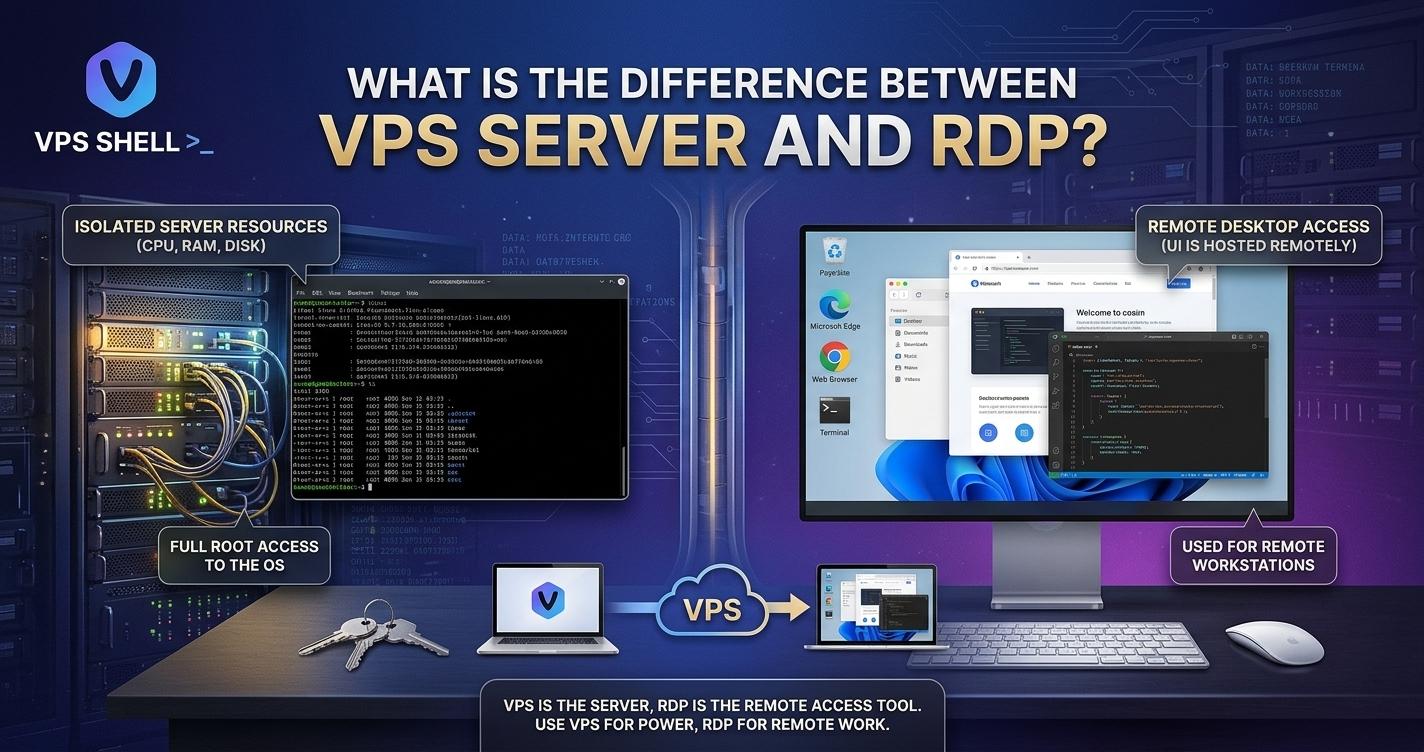
Here's the simple answer: a VPS is a virtual server, while RDP is a way to connect to a computer remotely. They serve different purposes, although they often work together.
For example, you could rent a Windows VPS and use Remote Desktop Protocol (RDP) to access its desktop from your own PC. You get the server and a way to control it, even when you're nowhere near the machine.
Let's look at how both options work, what they cost, and which one makes sense for your needs.
What Is a VPS Server?
A Virtual Private Server (VPS) is a virtual machine hosted on a physical server. A hosting provider uses virtualisation software to divide a physical machine into separate virtual servers.
Each VPS receives its own allocated resources, such as RAM, CPU power, and storage. Depending on the plan, you can install an operating system, run applications, host websites, or manage your own services.
Think of it like renting a small office inside a larger building. The building is shared, but your office has its own space and purpose.
A VPS can be used for:
-
Hosting websites and online shops.
-
Running business applications.
-
Managing databases.
-
Testing software and development projects.
-
Hosting game servers.
-
Running a remote Windows desktop.
-
Keeping services online around the clock.
You can choose a Linux or Windows VPS, depending on your software and technical needs. Linux is popular for websites and development tools, while Windows may suit applications that need a Windows environment.
The level of control depends on the package. An unmanaged VPS usually gives you more responsibility for setup and maintenance, while a managed plan includes help with some server tasks.
What Is RDP?
RDP stands for Remote Desktop Protocol. It's a Microsoft protocol that lets you connect to another computer over a network and control it from your own device.
When you connect through RDP, the remote computer's desktop appears on your screen. You can open programs, manage files, and carry out tasks as if you were sitting in front of that computer.
For example, imagine you're away from your office but need to use software installed on your work computer. If remote access is set up correctly, RDP can let you use that computer from your laptop.
RDP is commonly used for:
-
Accessing a Windows computer from another location.
-
Working with software installed on a remote machine.
-
Managing a Windows server.
-
Supporting employees who work from home.
-
Carrying out administrative tasks without being physically present.
Here's the important bit: RDP isn't a hosting plan or a type of server. It's the connection method.
You need a computer or server that supports remote access before you can use RDP. That computer might be in your office, at home, or hosted by a VPS provider.
VPS Server vs RDP: What's the Difference?
The main difference is what each one provides.
A VPS gives you a virtual machine with allocated resources. RDP gives you a way to access a compatible computer remotely.
| Feature |
VPS Server |
RDP |
| What it is |
A virtual server |
A remote access protocol |
| Main purpose |
Running websites, software, and services |
Controlling a computer remotely |
| Provides server resources |
Yes, through the hosting plan |
No, not by itself |
| Needs a computer or server |
It is the virtual machine |
Yes, it connects to one |
| Can host websites |
Yes, if configured for it |
Not by itself |
| Can provide a remote desktop |
Yes, if the operating system and setup support it |
It provides the connection method |
| Operating system |
Linux or Windows, depending on the plan |
Commonly used to access Windows systems |
| Typical cost |
Depends on server resources and management |
Depends on the remote computer or service being used |
One thing worth remembering is that VPS and RDP aren't competing products in every situation. You can use them together.
A Windows VPS may include RDP access, allowing you to connect to its desktop from your own computer. The VPS provides the resources; RDP lets you control it.
When Should You Choose a VPS Server?
A VPS is usually the better option when you need a server that runs your own websites, applications, or online services.
1. You Want to Host a Website
If you're running a business website, blog, or online shop, a VPS can give you more control over the hosting environment.
You can configure supported software, manage server settings, and increase resources when your website grows. However, you'll need to keep the server secure and maintain the applications you install.
2. You Need to Run an Application
Some business tools need specific software or server settings. A VPS gives you more freedom to install and configure applications than many basic shared hosting plans.
Before buying, check the software's system requirements. Make sure the VPS has enough memory, processing power, storage, and operating system support.
3. You Need Services Running Around the Clock
A VPS can keep supported applications and services running without leaving your personal computer switched on at home.
This can be useful for websites, APIs, databases, and other online services. Your provider's uptime, network quality, and maintenance practices still matter, so check these before choosing a plan.
If you're comparing providers for projects aimed at Eastern European users, explore high-performance Ukraine server hosting plans to review available server resources, features, and pricing. Check the actual server location and specifications before deciding whether they fit your project.
When Is RDP the Better Choice?
RDP makes more sense when your main goal is to access a computer from somewhere else.
1. You Need a Remote Windows Desktop
Suppose you use a Windows application for work but don't want to carry your office computer everywhere. A remote Windows machine with RDP access may solve that problem.
You can connect from a compatible device and use the software installed on the remote machine.
2. You Work from Different Locations
RDP can help staff access a work computer when they're at home, travelling, or working from another office.
However, remote access should be set up securely. Businesses should use strong authentication, restrict access to trusted users, and consider a VPN or remote access gateway.
3. You Need to Manage a Remote Computer
RDP is also useful for managing Windows computers and servers without travelling to their physical location.
You can open applications, change settings, and perform other tasks allowed by your account permissions.
Just remember that RDP doesn't provide extra CPU power or memory. The remote computer does the work, so its resources determine how well applications run.
Can You Use VPS and RDP Together?
Yes, and this is where the two terms often get mixed up.
A Windows VPS gives you a virtual machine running Windows. If the provider enables RDP access and the required settings are in place, you can connect to it from your local computer.
For example, a small business might rent a Windows VPS to run a supported application. An employee can then connect to the server through RDP to use that application remotely.
This arrangement can offer several benefits:
-
The remote machine can stay online without relying on an office PC.
-
Staff can access approved applications from different locations.
-
The business can choose a server with suitable RAM and CPU resources.
-
Files and applications can remain on the remote machine rather than being installed on every local device.
There are limits, of course. A Windows VPS may require a suitable licence, and some providers charge extra for Windows or remote desktop services. You should also check the provider's terms, supported number of users, and security options.
VPS and RDP Costs: What Should You Budget For?
The cost depends on what you need to run and how much support you want.
A basic VPS may cost only a few pounds per month, while a more powerful Windows VPS can cost considerably more. Windows licensing, additional storage, backups, and management may add to the bill.
RDP itself is a protocol, so its cost depends on the computer or service you're accessing. You might use RDP to connect to your own office PC, or pay for a remote Windows machine that includes remote access.
Before choosing, compare:
-
Monthly and renewal prices.
-
RAM, CPU, and storage.
-
Windows licensing costs, if applicable.
-
Backup and recovery options.
-
Technical support.
-
Security features.
-
Whether remote desktop access is included.
-
The number of users permitted by the service and licence.
Don't choose a plan based on price alone. A cheap service may not have enough resources for your software, while a more expensive package may include features you don't need.
How to Keep VPS and RDP Access Secure
Both options need proper security. An exposed server or poorly protected remote connection can put your files and applications at risk.
Follow these basic steps:
-
Use long, unique passwords.
-
Enable multi-factor authentication where supported.
-
Install security updates promptly.
-
Restrict remote access to trusted users and networks.
-
Avoid exposing RDP directly to the internet where possible; use a VPN or secure gateway.
-
Keep regular backups and test that you can restore them.
-
Remove accounts and software you no longer need.
-
Monitor login attempts and unusual activity.
If you don't have the time to manage these tasks, look for a managed service or ask a qualified administrator to help.
Conclusion: Which Option Should You Choose?
The choice comes down to what you want to do. Choose a VPS server if you need virtual server resources to host websites, run applications, or keep online services running. Choose RDP if you need a way to control a remote computer. If you want a Windows desktop hosted online, you may use both together.
Before you buy, check the operating system, available resources, licence costs, security options, and level of support. If you're comparing European server options, discover powerful VPS hosting Romania solutions and review the available plans to find one that suits your workload and budget.
Get clear on your needs first, and you'll be far less likely to pay for a service that doesn't do the job.
Frequently Asked Questions
1. Is a VPS server the same as RDP?
No. A VPS is a virtual machine with allocated server resources. RDP is a protocol used to access and control a remote computer. A Windows VPS can offer RDP access, so you can use both together.
2. Do I need a VPS to use RDP?
No. You can use RDP to connect to a compatible computer, such as a Windows PC in your office. A VPS is one possible remote machine, but it isn't the only option.
3. Can I host a website on an RDP server?
RDP doesn't host websites by itself. You need a computer or server configured to run the website. You might use RDP to manage a Windows VPS that hosts your site.
4. Is a Windows VPS good for remote work?
It can be useful if you need a Windows desktop or specific Windows applications available from different locations. Check the server resources, licensing, remote access terms, and security features before buying.
5. Which is cheaper: VPS or RDP?
They're not direct alternatives, so the cost depends on what you're comparing. A VPS has a hosting fee, while RDP is a connection protocol. Remote desktop service


Share this page with your family and friends.